


Having an HRIS doesn’t eliminate the need to conduct an employee file audit. As part of our client audit process, our HR consultants spend days reviewing employee documents. Now, our audits follow the digital paper trail.
An HRIS makes it easier to maintain records; they can also make it easier to assume that the system is automatically compliant right out of the box. Out of sight, out of mind.
Whether you set up the system yourself or inherited it, start with an employee file audit by pulling a small sample. A full audit can be daunting; we suggest you start with one or two records from each category below.
Depending on what you find, you may need to take a deeper dive into the rest of the system and complete a full audit. But let’s start with the following files and checks before you begin worrying about having to do that.
Form I-9
What to check:
Are any of the following missing:
- Forms
- Signatures
- Incomplete fields
- Overdue or missing re-verifications (where required)
Retention: Forms are kept throughout employment and, after separation, until three years after hire or one year after employment ends, whichever is later.
What can go wrong: Missing forms, incomplete fields, and deficiencies in electronic records can expose employers to civil penalties. Since ICE has recently reclassified many common clerical and technical paperwork errors as substantive violations it’s even more important to conduct an employee file audit.
Go to the Source:
Form W-4 and State Withholding Forms
What to check: Follow a sample revised form from submission through the next applicable payroll run.
Verify the following:
- Settings and effective date
- Restrict access to authorized staff
- Check that historical forms are retrievable
Retention: Keep employment tax records, including W-4s, for at least four years after filing the fourth quarter for the year. Check state rules separately.
What can go wrong: A form that reaches the HRIS but fails to update payroll can cause too much or too little tax to be withheld. Missing forms also make it harder to show how withholding was calculated during an IRS review.
Go to the Source:
IRS Employment Tax Recordkeeping
IRS Retention Guidance
Wage Notices, Timekeeping & Payroll Records
What to check: Trace one nonexempt employee’s workweek from timecard to pay statement. Review and check the following:
- Any edits to timesheets
- Missed time
- Automatic meal deductions
- Rounding
- Overtime
- Check that payments (nondiscretionary bonuses and shift differentials are included in the regular rate when required.
- Hire and pay-change notices
- Commission terms
- Pay statements
- Deduction authorizations
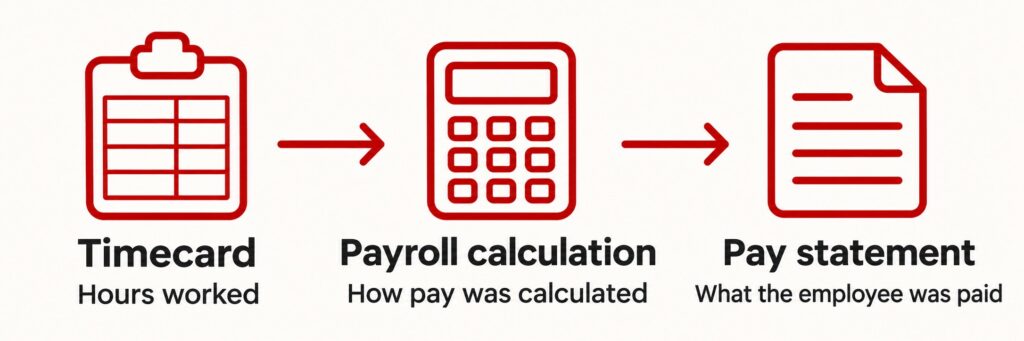
Retention: Under the FLSA, payroll records generally must be kept for at least three years and supporting wage calculation records, such as timecards, for at least two years. Apply longer periods where required.
What can go wrong: A payroll setting can repeat an underpayment across multiple employees and pay periods. Incomplete time records make it harder to reconstruct what employees are owed. Missing notices or unauthorized deductions can also create separate state-law exposure.
Go to the Source:
DOL Overview Regular Rate of Pay
Employee Handbook and Policy Acknowledgments
What to check: Open a sample acknowledgment and pull up the exact version it references. Verify the following:
- Employee
- Date
- Policy version
Retention: Keep prior versions with their acknowledgments for at least two years.
What can go wrong: If the HRIS overwrites old versions or stores a receipt without the associated policy, the employer may have difficulty showing what it communicated. A receipt establishes delivery or acknowledgment. The employer still needs to apply the policy lawfully and consistently.
Go to the Source:
No federal or state law requires employee handbooks. However, it’s best practice to have an employee handbook. They can mitigate liability by outlining a company’s practices and policies, as well as the legal rights and obligations of employees and their employer.
FMLA Documentation
What to check: Follow a certification from upload to storage. If you don’t have one, create a test certification.
Check the following:
- Specific dates FMLA is taken, including incremental leave
- FMLA leave is clearly designated as such
- Any and all communications between employee and employer regarding FMLA
Copies of the following:
- Employee notices
- Requests for FMLA
- Eligibility notices
- Rights and obligations notices
- Designation notices provided to employee
- Medical certifications and recertifications
- Related medical records
- Records of any dispute
Retention: Required FMLA records generally must be kept for at least three years.
What can go wrong: A misfiled certification can expose medical information to staff who have no need to see it and create a confidentiality violation. An employer may also need to investigate whether information a manager saw influenced a later employment decision.
Go to the Source:
DOL FMLA Fact Sheet
DOL Recordkeeping Requirements
Permissions & Access: Three Checks for Each Record
A folder labeled “Confidential” tells you how a record was filed. But in electronic recordkeeping, it’s harder to see what should be confidential and make sure it stays that way.
To see whether it’s actually protected, check what a manager can open or download from their own account. Start with one sample record and follow it from upload to retrieval.
These three checks can help you spot gaps in filing, access, and retention before an employee raises a concern or an auditor asks for a copy.
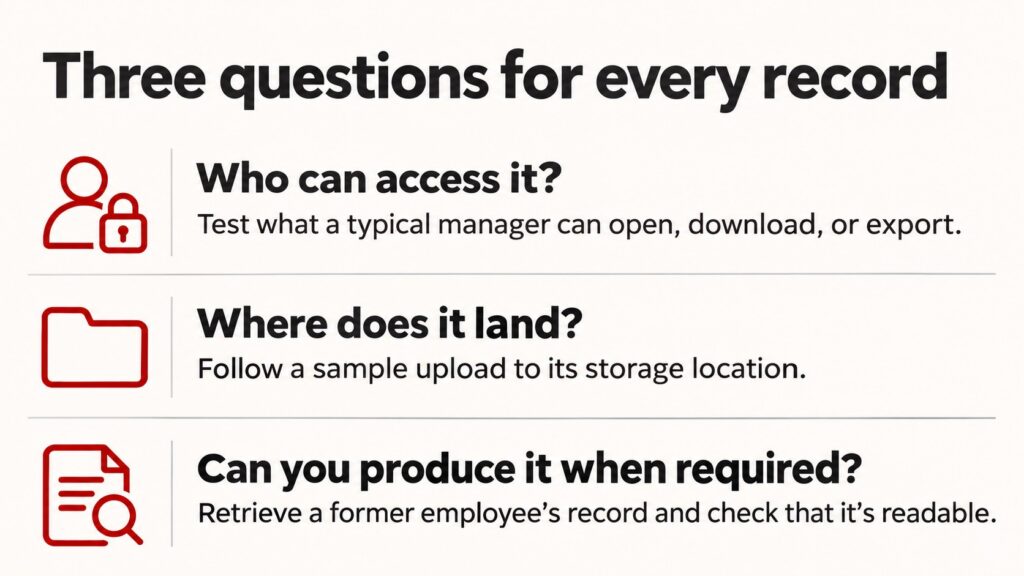
- Who can access it? Test what an authorized user and a typical manager can open, download, or export.
- Where does it land? Follow the normal upload process and check where bulk imports go. If you migrated systems, spot-check SharePoint or the old platform for copies with broader access.
- Can you produce it when required? Pull a former employee’s record, confirm the retention date, and check that the record and any required audit history are readable and retrievable. Verify that routine deletion can be paused when records must be preserved.
Employee File Audit Starts with One Record
It’s easy to put off reviewing your digital employee files when payroll is running, and everyone can find what they need. But the day a manager opens a confidential medical record, or an investigator asks for an I-9, is not the time to discover a gap.
Start this week with one record. Follow it from upload to storage, check who can open it, and download a copy to make sure it’s legible. If something surprises you, or the permissions aren’t aligning, use that result to decide what to review next.
If you’re unsure where to start or what to fix first, contact impactHR. We can help you review how your HRIS handles sensitive records, spot gaps in access and retention, and prioritize fixes your team can implement.
